How to monitor Claude Code usage limits before they stop you
Published June 2026 · 5 min read
Claude Code has two invisible rate limits that most developers only discover the hard way: a hard stop mid-task when their session fills or their weekly cap runs out.
This guide explains what those limits are, how to see them, and how to set up a persistent ambient monitor so you never get caught mid-task again.
The two Claude Code rate limits
Session limit (5-hour window)
Claude Code tracks usage in rolling 5-hour windows. When you fill this window, Claude Code stops responding until the window resets. The reset time is rolling — it's 5 hours after your first message in that session, not a fixed clock time.
Weekly limit (7-day window)
There's also a 7-day rolling window. This is the harder one to manage: you can be at 40% session usage and not realize your weekly window is at 95% until it blocks you.
Option 1: Run /usage inside Claude Code
The built-in command. Run it any time to see both windows:
/usageThis works, but it's reactive: you have to remember to check, and it pulls you out of your flow to open a terminal window.
Option 2: Use the status line
Claude Code's status line (the bar at the bottom of the terminal) shows usage data
when you add the right hook to ~/.claude/settings.json. This is always
visible while Claude Code is open but disappears when you switch windows.
Option 3: Headroom — ambient menu bar monitor
Headroom puts both usage percentages in your macOS menu bar as a live number that's always visible, even when you're in a browser or another app:
The menu bar shows CC 10%·65% — session·weekly — so you always know
where you stand at a glance. It goes amber at 70% and red at 90% on whichever window
is closer to its limit.
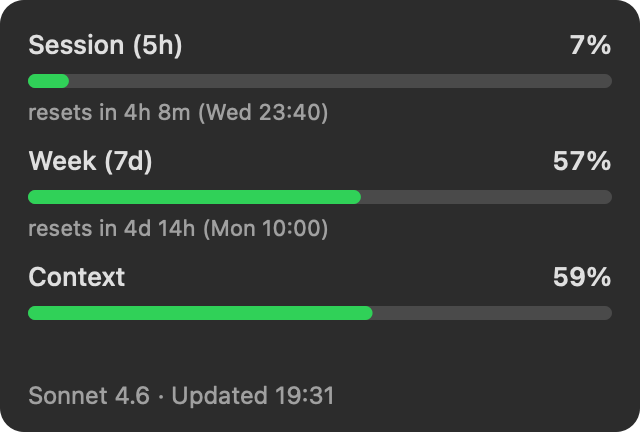
The dropdown adds:
- Session (5h) bar with exact percentage and countdown to reset
- Weekly (7d) bar with exact percentage and countdown to reset
- Context window fill percentage
- Active model (Sonnet, Opus, Fable)
- Session cost
- macOS notifications at 70% and 90% (configurable)
How Headroom works (the architecture)
Most Claude Code usage monitors work by polling the Anthropic API — which requires storing your API token somewhere and making periodic network requests.
Headroom works differently. Claude Code already knows your exact rate-limit numbers
and writes them to a local file (~/.claude/headroom-usage.json) via a
tiny status-line hook. Headroom reads that file. The result:
- Zero network calls — the app makes no requests to any server, ever.
Verify it yourself with
nettopor Little Snitch. - No API token needed — Headroom never sees your token. It reads the same numbers Claude Code renders in its own status line.
- Same numbers as
/usage— because it reads the same source.
~/.claude/settings.json
automatically on first launch. No manual configuration required.
Install Headroom
Download Headroom — free, macOS 13+~267 KB · Signed & notarized · Universal binary (Apple Silicon + Intel)
Or with Homebrew:
brew install --cask patwalls/tap/headroomOr build from source in ~10 seconds:
git clone https://github.com/patwalls/headroom.git
cd headroom/app && swift run
Configuring thresholds
By default, Headroom sends macOS notifications at 70% (warning) and 90% (critical)
for both the session and weekly windows. To change these, create
~/.claude/headroom-prefs.json:
{
  "warnThreshold": 0.8,
  "criticalThreshold": 0.95
}
FAQ
Does Headroom work with Claude Code on a Pro or Max plan?
Yes. Both plans have the 5-hour session and 7-day weekly limits. Headroom reads whichever limits Claude Code reports.
What if I use multiple Claude Code instances?
Headroom reads from a single file (~/.claude/headroom-usage.json). If
you run multiple instances, the last one to update wins. Support for multiple profiles
is on the roadmap.
Does the menu bar item stay visible when Claude Code isn't running?
Yes — Headroom shows the last known values until Claude Code updates the file again. The percentages are accurate as of the last time Claude Code ran.
How do I uninstall?
Quit Headroom from the menu bar, delete Headroom.app, and optionally
remove the hook line from ~/.claude/settings.json and
~/.claude/headroom-usage.json if you want a clean slate.